Condominium & HOA dues billing software
Related: Amenity booking · Tickets and maintenance · Free plan · FAQ
On the Pro plan, Leasdesk bills a condominium or HOA month by month: a dues invoice for every unit, payments recorded as they come in, and the bank statement matched line by line. The finished bookings and the shared expenses reach the invoices without being typed again.
The month’s run, with a preview first
Once a month, a manager opens Invoices and chooses Issue invoices: the year, the month and the due date. The preview shows what the run would do before anything is issued: the units to bill and those skipped, the estimated total, the expenses to split and the residents to be mailed.
Issuing creates one invoice for each unit with something to bill, numbered per property. A unit that already has a live invoice for that month is skipped, so running the month twice never bills a unit twice.
What goes on each invoice
- The monthly fee: the unit’s dues, set on each unit.
- Finished bookings with a fee: each confirmed booking of a paid amenity, once it has ended. See amenity booking.
- The unit’s share of the expenses, split by its participation share, to the cent. An expense tied to one building is shared among that building’s units only.
- A late fee, when the property sets a percentage: that percent of an overdue invoice’s balance, charged once per overdue invoice on the next run.
- Credits: a booking cancelled after it was billed comes back as a credit on a later invoice.
Add a charge or a credit by hand to an invoice that is still open; the total never drops below what has been paid. An invoice issued by mistake can be voided while it has no payments; once every invoice of a month is voided, that month’s expenses go back into the next run.
Payments, receipts and the invoice mail
Your team records each payment on the invoice with its amount, method (cash, transfer, card or other) and reference. Partial payments are fine, a payment above the balance is refused, and the invoice turns Paid at zero. A payment recorded by mistake can be deleted, which reopens the invoice.
The residents linked to the unit in Leasdesk are mailed in their own language, with a notice in the app:
- The invoice mail lists the lines and links to the invoice, where the PDF downloads. A manager can resend it.
- The receipt follows every recorded payment, with the balance left.
The PDF is one A4 page with the lines, the payments and the balance, in the language of whoever downloads it. The invoice list filters by unit, status and overdue, with the totals of what is open, outstanding and overdue.
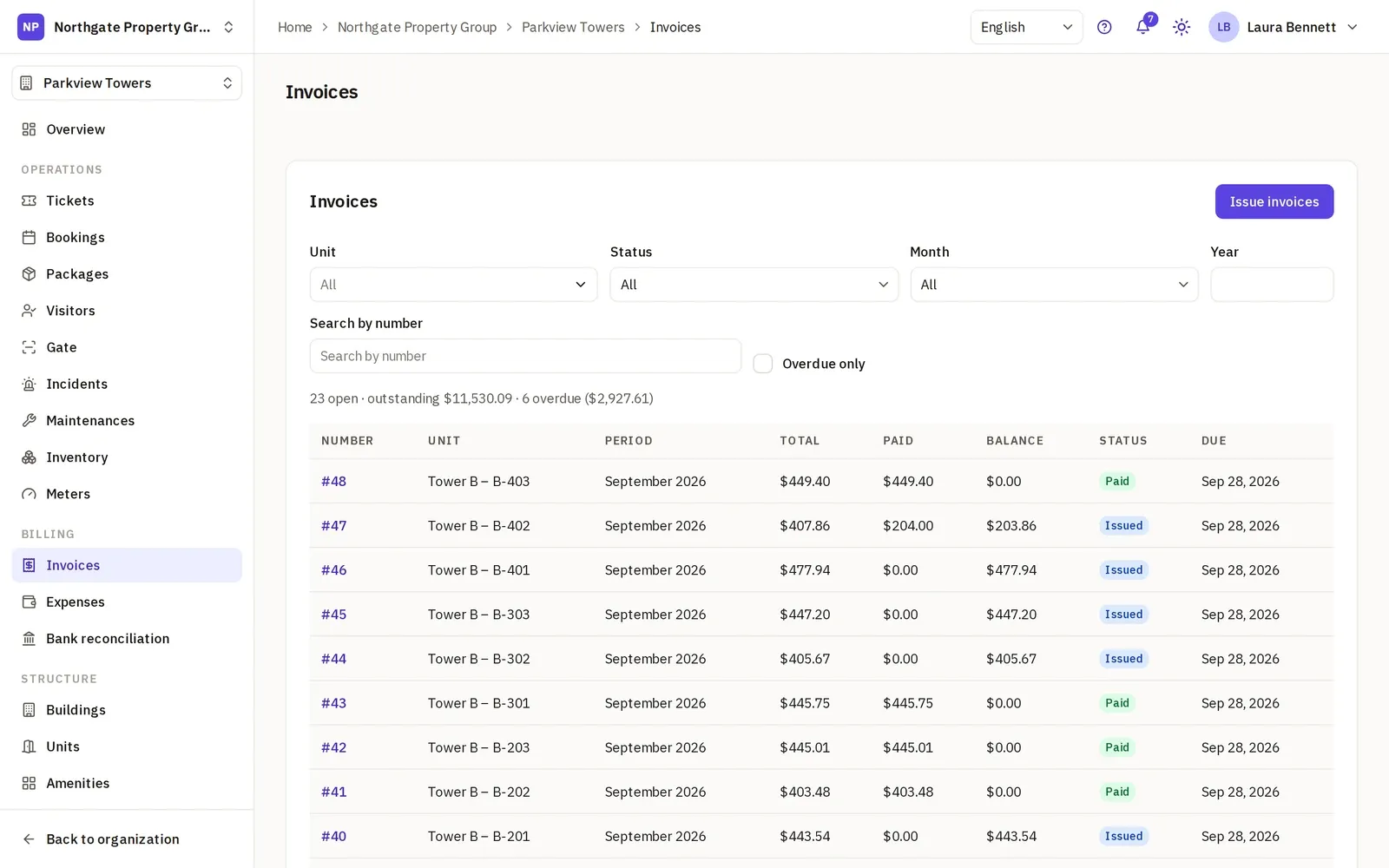
What residents see
A resident reads the invoices of the unit they live in and their PDFs, nothing of the other units, and the property’s expenses, so a share on their invoice can be traced to the bill behind it.
Expenses, and where their shares landed
Record each expense with its category, supplier, building, files and the day the property paid it. The next run splits it among the units with a participation share, and the expense then shows the invoice each share landed on.
Bank reconciliation
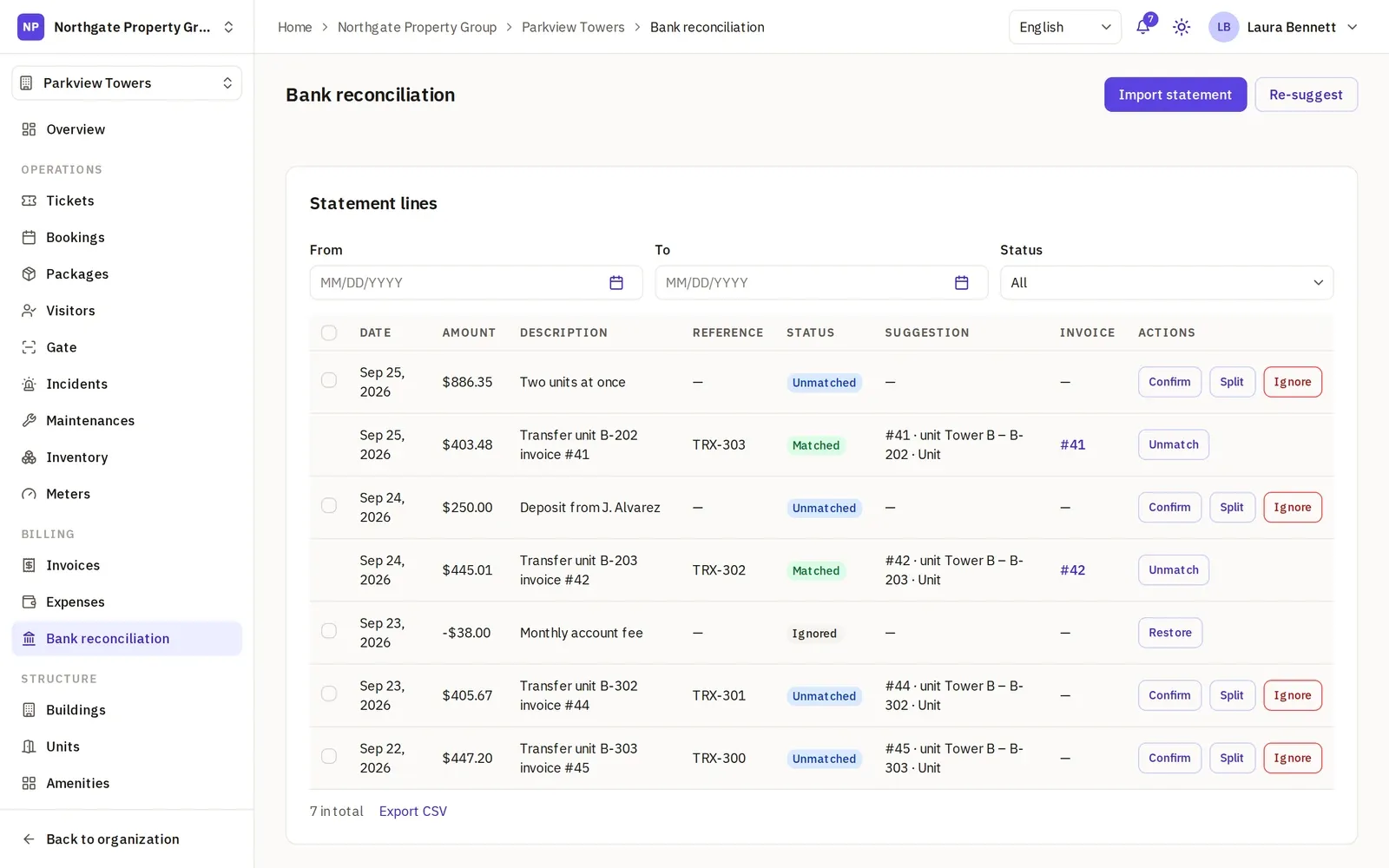
Import the bank statement as a CSV with your own column mapping: date, amount, description and, when the bank gives one, a reference. Lines already imported are skipped, so an overlapping statement does no harm.
- Suggestions: the open invoice behind each line, from the unit’s number in the text or a balance that matches exactly.
- Confirm records a transfer payment on the invoice and mails the receipt.
- Split spreads one transfer over several invoices.
- Ignore sets aside the bank’s fees and anything unrelated, which can be restored.
- Money going out is attached to an expense, which marks it paid.
Exports, currencies and who runs it
The invoices, the expenses and the bank statement each export as a CSV. Each property bills in its own currency, chosen in its settings.
The Org Administrator and the Manager hold the invoices and the expenses; the built-in Staff role has no access to them. A self-managed board gives the treasurer the role that fits (for property managers), and on Business a custom role can work the invoices and the bank statement without the tickets (for management companies).
Does it collect payments or keep the books?
No to both. What Leasdesk does not do:
- No online payment. There is no pay button; Stripe only bills your own Leasdesk subscription. Residents pay the way you already accept, and your team records it.
- No automatic run and no overdue reminders. Someone on your team starts each month; the late fee lands on the next invoice, and the overdue filter shows who is behind.
- No PDF attached to the mail and no receipt PDF. The mail links to the invoice, and the receipt is the mail itself.
- No credit balance, recurring expenses or daily interest. An overpayment is refused, each expense is recorded once, and the late fee is one percentage.
- No bank feed. The statement comes in as a CSV, not through a bank connection, OFX or CAMT.
- No accounting. No general ledger, budget or financial statements; the CSV exports go to whoever keeps the books.
Tickets, bookings and booking fees already work on Starter, the free plan; the fees go on the invoices once you move to Pro.
Start a Pro trial, set each unit’s monthly fee and the late fee, and issue your first month with the preview open.